
Best Portable Monitor for Laptop Under $100
A second screen changes how you work. The first time I plugged a slim panel into my laptop on a kitchen table and suddenly had two windows open side by side, I wondered why I waited so long to try one. Portable monitors used to feel like a niche gadget for streamers and trade show booths. Now they are something almost anyone working from a laptop can use, whether that means spreading out a spreadsheet, editing photos with a reference image open, or just giving your eyes more room so you stop squinting at tiny tabs.
The catch is that “under $100” covers a wide range of quality. Some of these screens are genuinely useful daily tools. Others are dim, washed out, and frustrating within a week. This guide walks through what you actually get at this price, which models hold up, and how to avoid the most common setup mistakes before you buy.
What “Under $100” Really Buys You
At this price point you are mostly looking at 1080p IPS panels between 13 and 15.6 inches, USB C or HDMI connectivity, and a simple folio case that doubles as a stand. That is genuinely enough for most people. Text looks sharp, colors are decent for general use, and the size fits easily into a backpack alongside a laptop.
Where budget models tend to cut corners is brightness and refresh rate. Many sit around 200 to 250 nits, which is fine indoors but struggles near a window or outdoors. If you plan to work in cafes with lots of natural light, look for something closer to 300 nits or plan to angle the screen away from glare. Refresh rate on budget panels is almost always 60Hz, which is perfectly smooth for documents, browsing, and video, but noticeably less fluid for fast paced gaming.
Build quality also varies more than people expect. Some panels feel like a tablet wrapped in aluminum. Others flex when you pick them up and the kickstand wobbles on anything but a flat table. If a listing does not mention the material of the back panel, assume it is plastic, which is not a dealbreaker but is worth knowing before it arrives.
Will It Actually Work With Your Laptop? Check This First
This is the step most buying guides skip, and it is the reason so many portable monitors get returned. Before you add anything to your cart, figure out what ports your laptop actually has and what they support.
If your laptop has USB C with video output (sometimes labeled DisplayPort over USB C or Thunderbolt), a single USB C cable can carry both video and power to the monitor at once. This is the simplest setup. Most newer MacBooks, many Windows ultrabooks, and recent Chromebooks support this.
If your laptop only has older USB C that handles data and charging but not video, or if it has USB A and HDMI only, you will need a monitor that includes an HDMI input, plus a separate cable to power the monitor itself. Older laptops, budget Windows machines, and some gaming laptops fall into this group.
A quick way to check is searching your laptop model plus “USB C video output” or looking in your laptop’s display settings to see if an external monitor option ever appears when nothing is plugged in versus when something is.
Top Picks Under $100
Best Overall: ZSCMALLS 15.6 inch Portable Monitor
This 1920×1080 IPS panel with built in speakers and a smart cover case has been a recurring pick in deal roundups, often dropping into the $50 to $70 range during sales. It includes two USB C ports, one mini HDMI port, and one micro USB port, along with the portable monitor and a smart cover case. For most people who just want a reliable extra screen for documents and browsing, this covers the basics without surprises.
Best for: students, remote workers, anyone wanting a no fuss second screen. Honest drawback: speakers are functional but tinny, and the kickstand built into the case is adequate rather than sturdy.
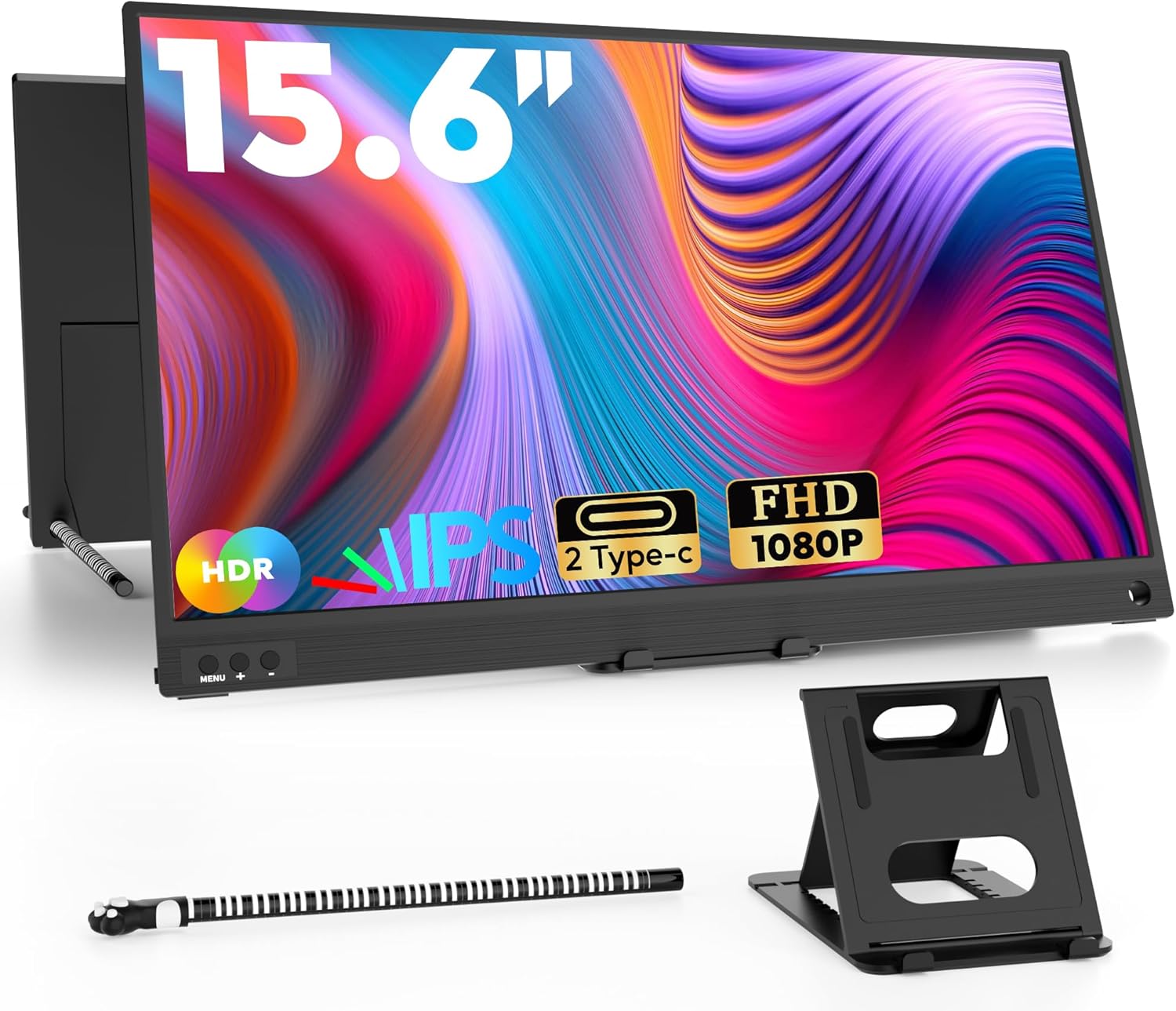
Portable Monitor, 15.6″ 1080P FHD Laptop Monitor
Best for Gaming on a Budget: KYY K3
This is a well rounded 1080p option that normally costs under $100 and features full USB C support, making it a popular choice for handheld gaming setups and as a secondary screen for consoles.
Best for: gamers who want a portable second display for handhelds or consoles. Honest drawback: 60Hz means it is not built for competitive fast paced titles, and is better suited to single player or casual use.
Best Compact Option: Topmonitor 10.5 inch
For people who prioritize portability above all else, smaller panels like this one trade screen real estate for size. It is built around a 10.5 inch IPS panel with 1280×1920 resolution, 500 nits brightness, a 2000:1 contrast ratio, 178 degree viewing angles, and weighs under one pound at just 0.3 inches thick.
Best for: travelers who want the lightest possible add on, or anyone using it mainly as a reference screen rather than a primary workspace. Honest drawback: the smaller size means less multitasking room, so it works better as a companion screen than a true second monitor.

Topmonitor Small Portable Monitor 10.5
Best Value Near the Limit: A1 Style 11 to 13 inch Monitors
A category of compact monitors with dual USB C ports and a mini HDMI input has become common around the $70 mark. One reviewer noted dual one watt speakers offering surprisingly good clarity for a monitor at this price, calling it almost unheard of under $100, though brightness and color performance fall behind pricier competitors.
Best for: anyone who wants extra connectivity options without stretching past $70 to $80. Honest drawback: color accuracy is noticeably weaker than mid range options, so this is better for productivity than photo or video work.
Setup Mistakes That Cause Most of the Frustration
The single biggest mistake is using the wrong cable. Not every USB C cable supports video data, and using one rated only for charging is the most common reason a portable monitor shows a blank screen or refuses to connect. If your monitor came with a cable, use that one first before troubleshooting anything else.
The second mistake is assuming the monitor will draw enough power from your laptop alone. Some laptops limit how much power they send through USB C, especially when the battery is low or when the laptop itself is charging through the same port. If your screen flickers or shuts off randomly, try plugging the monitor into a wall adapter using its second port rather than relying entirely on the laptop. A power bank with built in cables is a handy backup for this, since it removes the guesswork of finding the right cable when you are away from your desk.
If you travel often and switch between different wall socket types, a reliable international power adapter is worth keeping in your bag alongside your monitor, especially since most portable monitors rely on a standard wall plug for their second power input.
The third mistake is ignoring the stand angle and glare together. A monitor propped at the wrong angle under overhead lighting will wash out even on a bright panel, leading people to assume the screen itself is the problem when it is really the setup. If you often work from a couch or bed, pairing your monitor setup with a laptop rolling desk gives both screens a stable, adjustable surface, which solves a lot of angle and glare issues at once.
1080p vs Higher Resolution: Does It Matter at This Size?
On a 13 to 15.6 inch panel, 1080p looks sharp enough that most people cannot tell the difference from 1440p without sitting very close. Pixel density at this size means text and icons appear crisp, and the smaller screen actually works in your favor here.
Where resolution starts to matter more is if you plan to edit photos or videos and need to judge fine detail, or if you regularly run two windows side by side and want each half to feel like a full screen rather than a cramped one. For general productivity, browsing, email, and documents, 1080p at this size is not a compromise. It is simply the right fit.
Battery Powered vs Power Only Models
Most monitors under $100 do not include a built in battery and rely on power from your laptop or a wall adapter. This keeps the price down and the unit lighter, but it also means you need a free port and, ideally, a power source nearby for longer sessions.
Battery powered portable monitors exist but tend to push past the $100 mark once you add a decent battery capacity. If you are working somewhere without easy access to outlets for extended periods, that extra cost may be worth it. For most home, office, and cafe use, a power only model paired with a small power bank or your laptop’s own battery is enough to get through a working session.
Frequently Asked Questions
Do I need a separate power source for a portable monitor?
Often yes. If your laptop’s USB C port supports both video and sufficient power delivery, a single cable can run everything. If not, or if you notice flickering, plug the monitor’s second port into a wall adapter or power bank.
Can I use a portable monitor with a Chromebook?
Many newer Chromebooks support USB C video output, so a single cable setup works the same as on a laptop. Check your specific model’s specs for “USB C DisplayPort” support to confirm before buying.
Is 60Hz enough for everyday work?
Yes. 60Hz is smooth for documents, browsing, video calls, and streaming video. It only becomes a limitation for fast paced gaming where higher refresh rates make a visible difference.
Can I daisy chain two portable monitors off one laptop?
It depends on your laptop’s ports and graphics output limits. Some laptops can drive two external displays through separate USB C ports, while others are limited to one. Check your laptop’s specs for the number of supported external displays before planning a triple screen setup.
Will a portable monitor work with a tablet or phone?
If your tablet or phone supports USB C video output (common on many Android tablets and some phones), yes. iPhones and most iPads have more limited external display support, so check compatibility for your specific device first.
Final Recommendation by User Type
If you are a student or remote worker who wants one reliable extra screen for documents and browsing, the ZSCMALLS 15.6 inch is the safest pick. If you are gaming on the go with a handheld or console, the KYY K3 fits that role well. If portability matters more than screen size, the 10.5 inch Topmonitor is worth the tradeoff. And if you want a few extra ports without spending much more, the compact 11 to 13 inch options around $70 are a solid middle ground.
Whichever you choose, confirm your laptop’s port capabilities before ordering, and keep the cable that comes in the box. That single step prevents the vast majority of setup headaches people run into with budget portable monitors. And if your desk setup also involves charging a phone alongside your laptop and monitor, a magnetic charger stand is a small addition that keeps everything tidy without adding more cables to the mix.